手工打造 Windows Service
Step 1.新增專案
C# Express裡專案範本只有這幾個,不過沒關系,
先選主控台應用程式。

Step 2.在方案總管加入兩個新的類別

 第一個類別,負責當服務啟動及停止時要做的事情
先加入 System.ServiceProcess 的參考

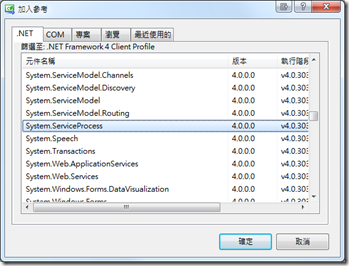
繼承 ServiceBase,並複寫 OnStart 及 OnStop
另外在建構式中 ,要初始化相關服務的資訊,
這個部分是Windows Service啟動時所需要的。
MyWinService.cs
using System;
using System.Collections.Generic;
using System.Linq;
using System.Text;
using System.ServiceProcess;
using System.Diagnostics;
using System.Timers;
namespace MyWinService
{
class MyWinService : ServiceBase
{
const string SERVICE_NAME = @"MyWinService";
System.Timers.Timer TheTimer = new System.Timers.Timer();
public MyWinService()
{
InitializeComponent();
}
private void InitializeComponent()
{
this.ServiceName = SERVICE_NAME;
this.CanStop = true;
this.AutoLog = false;
this.EventLog.Log = "Application";
this.EventLog.Source = SERVICE_NAME;
}
protected override void OnStart(string[] args)
{
//Todo: 從 config 取得 Interval
TheTimer.Interval = 30 * 1000;
TheTimer.Elapsed += new ElapsedEventHandler(TheTimer_Elapsed);
TheTimer.Start();
this.EventLog.WriteEntry(SERVICE_NAME + " Service has started.");
}
protected override void OnStop()
{
TheTimer.Stop();
this.EventLog.WriteEntry(SERVICE_NAME + " Service has stopped.");
}
protected void TheTimer_Elapsed(object sender, ElapsedEventArgs e)
{
//Todo: your code here
}
}
}
第二個類別,服務安裝程式會呼叫到的類別,負責將安裝服務
加入 System.Configuration.Install 的參考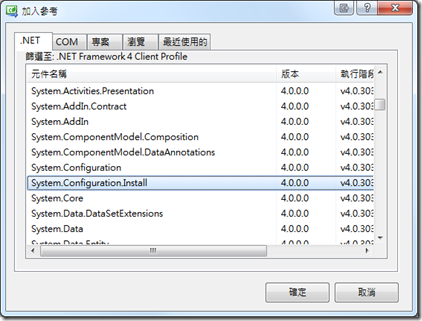
MyWinServiceInstaller.cs
using System;
using System.ServiceProcess;
using System.ComponentModel;
using System.Configuration.Install;
namespace MyWinService
{
[RunInstaller(true)]
public class MyWinServiceInstaller : Installer
{
const string SERVICE_NAME = @"MyWinService";
private ServiceProcessInstaller ServiceProcessInstaller1;
private ServiceInstaller ServiceInstaller1;
public MyWinServiceInstaller()
{
InitializeComponent();
}
private void InitializeComponent()
{
this.ServiceProcessInstaller1 = new ServiceProcessInstaller();
this.ServiceProcessInstaller1.Account = ServiceAccount.LocalSystem; //服務啟動預設登入類型(安全性)
this.ServiceProcessInstaller1.Username = null;
this.ServiceProcessInstaller1.Password = null;
this.ServiceInstaller1 = new ServiceInstaller();
this.ServiceInstaller1.Description = "這裡寫服務的描述";
this.ServiceInstaller1.DisplayName = SERVICE_NAME;
this.ServiceInstaller1.ServiceName = SERVICE_NAME;
this.ServiceInstaller1.StartType = ServiceStartMode.Automatic; //啟動模式(自動/手動/停用)
this.Installers.AddRange(new Installer[] { this.ServiceProcessInstaller1, this.ServiceInstaller1 });
this.Committed += new InstallEventHandler(MyWinServiceInstaller_Committed); //當安裝成功後,啟動服務
}
void MyWinServiceInstaller_Committed(object sender, InstallEventArgs e)
{
// Auto Start the Service Once Installation is Finished.
var controller = new ServiceController(SERVICE_NAME);
controller.Start();
}
}
}
Step 3.主程式
這個部分是負責服務啟動時,載入 MyWinServices 類別
另外安裝及解除安裝也一併在這裡處理,方便設定服務,而不需要另外包裝安裝程式。
Program.cs
using System;
using System.Collections.Generic;
using System.Linq;
using System.Text;
using System.IO;
using System.Diagnostics;
using System.ServiceProcess;
using System.Runtime.InteropServices;
namespace MyWinService
{
class Program
{
/// <summary>
/// 主程式
/// </summary>
/// <param name="args"></param>
[STAThread()]
static void Main(string[] args)
{
//沒有輸入參數的時候,當做起動服務的入口(若啟動服務也需要參數的話,這邊要改寫)
if (args.Length == 0) {
System.ServiceProcess.ServiceBase.Run(new MyWinService());
} else {
if (args[0].ToUpper() == "/INSTALL") {
//安裝
InstallService();
} else if (args[0].ToUpper() == "/UNINSTALL") {
//解除安裝
UnInstallService();
} else {
Console.Write("輸入的參數不正確!");
}
}
}
static string INSTALL_EXE = Path.Combine(RuntimeEnvironment.GetRuntimeDirectory()
, @"InstallUtil.exe");
static void InstallService()
{
string currFileName = Process.GetCurrentProcess().MainModule.FileName;
Process.Start(INSTALL_EXE, string.Format(@"""{0}""", currFileName));
}
static void UnInstallService()
{
string currFileName = Process.GetCurrentProcess().MainModule.FileName;
Process.Start(INSTALL_EXE, string.Format(@"/u ""{0}""", currFileName));
}
}
}
這樣就大功告成囉!
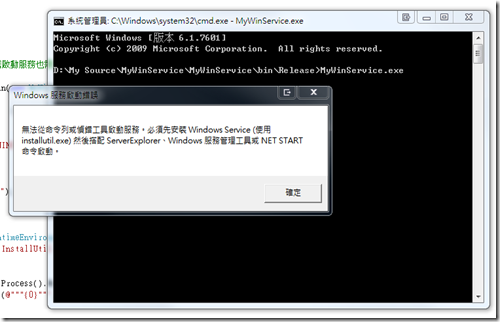
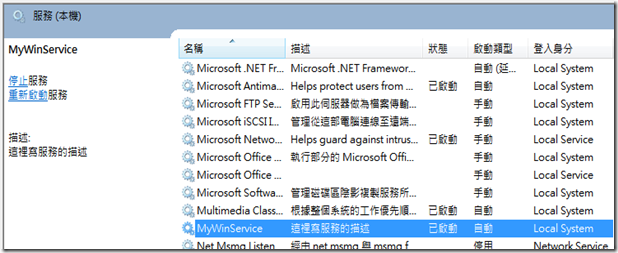
以下是執行的畫面:
直接執行不給參數會要求我們要安裝服務
使用 /install 安裝服務:
 服務安裝成功並啟動:
參考資訊:http://social.msdn.microsoft.com/Forums/en/Vsexpressvcs/thread/8b9207c8-4b59-4740-b6c3-c5fb1d8fea56


